You publish a new page on your website.
You submit it in Google Search Console.
Googlebot visits it.
Everything looks fine — no errors, no manual actions, no warnings.
But then you see the status:
Crawled but Not Indexed Currently
At first glance, it feels confusing. If Google has already crawled your page, why isn’t it showing in search results?
This issue is more common than most website owners realize. It happens to bloggers, service businesses, eCommerce stores, and even established websites.
The important thing to understand is this:
Google didn’t reject your page because of a technical failure. It simply decided not to include it in the search index — at least for now.
In this guide, we’ll break down what this status really means, why it happens, and what you can realistically do to improve your chances of getting indexed.
Understanding the Difference Between Crawling and Indexing
Many people use these terms interchangeably, but they are not the same.
Crawling means Googlebot visited your page and read its content.
Indexing means Google stored that page in its database so it can appear in search results.
A page can be crawled without being indexed. When you see “Crawled but Not Indexed currently” it means Google saw the page but chose not to store it in the searchable index.
This is not necessarily permanent. It can change.
But you need to understand why it happened.
Why Google Chooses Not to Index a Page
Google’s goal is to show users the best possible results. If a page doesn’t appear valuable compared to other available pages, Google may skip it.
Here are the most common reasons.
1. The Content Doesn’t Offer Anything New
If your page repeats information already available on hundreds of websites, Google may not see a reason to index it.
For example:
- Generic definitions
- Basic “what is” articles without depth
- Content rewritten from top-ranking pages
Search engines are constantly comparing pages. If your content doesn’t add something original — a unique perspective, real experience, deeper explanation — it may not make the cut.
2. The Page Is Too Short or Too Shallow
A 300-word article trying to rank for a competitive keyword rarely succeeds.
Short content isn’t automatically bad. But if the topic requires depth and your page barely scratches the surface, Google may consider it incomplete.
Comprehensive topics need comprehensive answers.
3. Weak Website Authority
New domains often experience indexing delays.
If your website:
- Has very few backlinks
- Has minimal traffic
- Has little publishing history
Google may crawl your content but wait before indexing it.
Authority and trust build gradually.

4. Poor Internal Linking
Pages that are isolated from the rest of your site tend to struggle.
If no other page links to your new article, Google may assume it’s not important.
Internal links act as signals. They tell search engines which pages matter.
5. Similar Pages Competing Against Each Other
If you have multiple pages targeting nearly identical keywords, Google may index only one and ignore the others.
This is often called keyword cannibalization.
For example:
- “Best SEO Tips”
- “Top SEO Strategies”
- “SEO Techniques Guide”
If all three cover almost the same content, Google may select one and skip the rest.
6. Technical Quality Isn’t Strong Enough
Even without visible errors, subtle technical issues can impact indexing:
- Slow loading speed
- Poor mobile usability
- Large unoptimized images
- Heavy JavaScript rendering
Google prefers pages that load fast and work well on mobile devices.
How to Fix Crawled but Not Indexed
Now let’s focus on practical actions.
There’s no magic button, but there is a clear process.
Step 1: Upgrade the Content Significantly
Instead of making small edits, think bigger.
Ask yourself:
- Does this page truly solve the user’s problem?
- Is it better than the top five results?
- Does it include examples or practical advice?
Improve by:
- Adding detailed explanations
- Including real-life examples
- Breaking content into clear sections
- Adding FAQs
- Improving formatting and readability
Make your page undeniably useful.
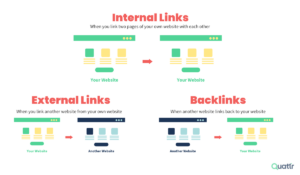
Step 2: Strengthen Internal Links
Find related pages on your website and add contextual links to the affected page.
Use descriptive anchor text that matches the topic naturally.
Also consider:
- Adding the page to your main navigation (if important)
- Linking from your homepage (if relevant)
- Including it in category pages
Internal links show priority.
Step 3: Merge or Remove Similar Pages
If you have two or three weak articles on similar topics, combine them into one strong, comprehensive piece.
Redirect the old URLs to the improved version.
This prevents dilution and strengthens the main page.
Step 4: Improve Technical Performance
Check:
- Page loading time
- Mobile responsiveness
- Core Web Vitals
Compress images.
Remove unnecessary plugins.
Optimize scripts.
Even small performance improvements can help indexing.
Step 5: Earn External Links
Backlinks are still powerful trust signals.
You don’t need hundreds.
Even a few high-quality links from relevant websites can increase your credibility in Google’s eyes.
Consider:
- Writing guest posts
- Sharing insights on industry blogs
- Collaborating with other businesses
- Creating shareable resources
When other sites reference your page, indexing becomes more likely.
Step 6: Update and Request Indexing Again
After making meaningful improvements: for Crawled but Not Indexed
- Go to Google Search Console
- Use URL Inspection
- Click “Request Indexing”
Avoid repeatedly submitting without changes. That rarely works.
Improve first. Then request.
How Long Should You Wait?
There is no exact timeframe for Crawled but Not Indexed
Some pages get indexed within days.
Others take weeks.
If your website is new, delays are normal.
Focus on building quality consistently rather than obsessing over one page.
What Not to Do
When facing indexing issues, many website owners panic and make mistakes.
Avoid:
- Publishing large amounts of low-quality content
- Copying competitor articles
- Stuffing keywords unnaturally
- Repeatedly clicking “Request Indexing” daily
- Deleting pages immediately without analysis
SEO requires patience and improvement — not shortcuts.
When Should You Be Concerned?
If:
- A large percentage of your website is not indexed
- Important service pages are ignored
- Older pages suddenly drop out of the index
Then you may need a deeper audit.
Check:
- Robots.txt settings
- Noindex tags
- Canonical tags
- Manual actions in Search Console
But for a few isolated pages, it’s usually a quality or authority issue.
A Smarter Way to Think About Indexing
Instead of asking, “Why isn’t Google indexing my page?”
Ask:
“Would I bookmark this page if I found it in search results?”
If the honest answer is no, improve it.
Search engines aim to reflect user satisfaction. If your page truly provides clarity, insight, and value, indexing becomes much more likely.
The Long-Term Strategy
To reduce indexing problems in the future:
- Publish fewer but stronger articles
- Focus on topical authority
- Build structured internal linking
- Improve site speed continuously
- Earn relevant backlinks over time
- Update older content regularly
Websites that demonstrate expertise and consistency rarely struggle with Crawled but Not Indexed.
Final Thoughts
“Crawled but Not Indexed currently” is not a penalty.
It’s not a punishment.
It’s simply Google being selective.
Search engines don’t owe any page a position in their index. Every URL must earn its place.
If you improve your content quality, strengthen site structure, and build trust signals, Crawled but Not Indexed usually follows.
Think long term.
SEO is not about convincing Google to index your page once.
It’s about building a website Google trusts again and again.